
How Composed works
Your brain isn’t a calendar. Composed is.
Composed is an AI calendar for iPhone and iPad. Say a plan once, and it’s on your calendar with the place attached, reminded at the right time, and you’re told when to leave. Here is the whole app, one real screen at a time.
Free for 5 active items you add; calendar imports and birthdays don’t count.
On a computer? Point your iPhone camera at the code to get Composed on your phone.
- Effortless scheduling. Say it, snap it, type it. It’s on your calendar.
- To-dos, deadlines and notes. All fully connected, in one app.
- Works with your calendar. Google and Apple Calendar, both ways.
- Never forget a date. Birthdays, anniversaries, the furnace filter.
“Hey Siri, plan with Composed.”
Composed opens, already listening.
Say the plan the way you would tell a friend: “Dinner at Nopa Friday at 7:30 with Sarah.” Composed puts it on Friday at 7:30 PM, finds Nopa on the map and attaches the exact address, so leave-by works without you looking anything up.
The same goes for a to-do (“pick up the dry cleaning”), a deadline (“renew my passport by the 20th”) or a note. Rather type? Type the same sentence.
Plans, to-dos, deadlines and notes. All by voice.

Show up.
Never open the app to check. Your phone and watch say when to go.
With your permission, Composed follows your real-time location and works out the drive to each plan. When it is time to go, the reminder says so, on your iPhone and on your Apple Watch.
For a flight it counts the airport too: the drive, then check-in and security. The photo below is a real Composed notification, on a boat in Boracay, with a flight to Manila that afternoon.

Just glance.
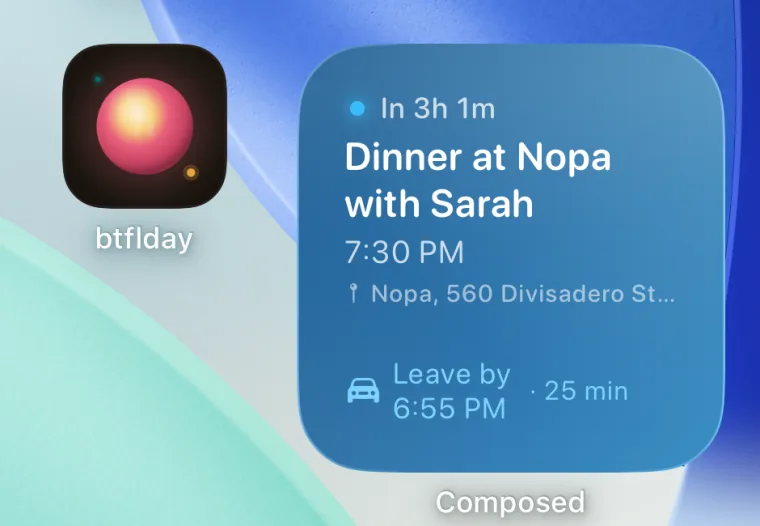
The Composed widget shows what’s next, without opening the app.
Put the widget on your Home Screen and your next plan sits there with a countdown and the time to leave. There are Lock Screen widgets too, and when you set off, your drive shows live on the Lock Screen.
Stop checking your calendar.
Forget it.
Today holds it all, so your head doesn’t have to.
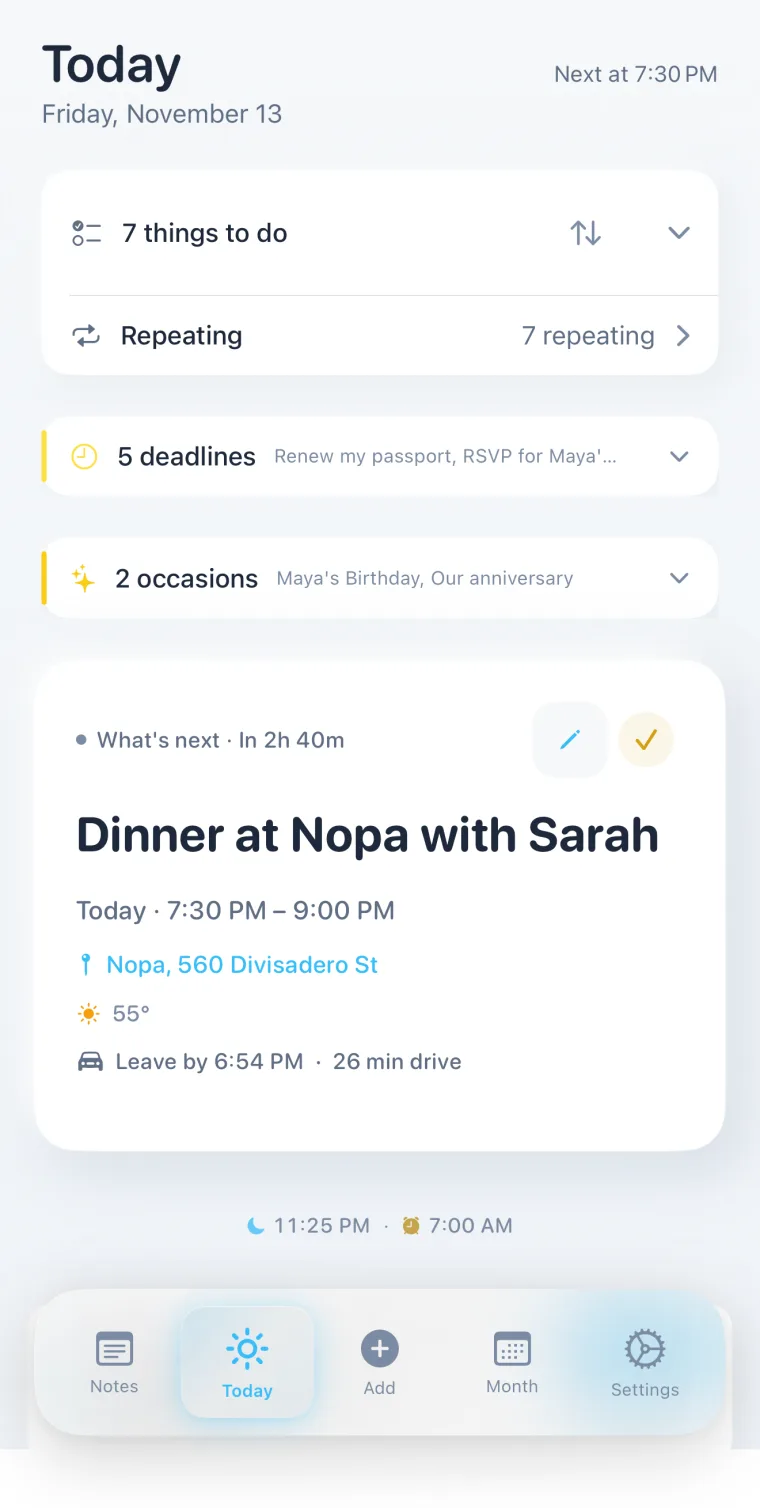
One page for the day: the things to do, deadlines coming up, birthdays and anniversaries, what’s next with its weather and leave-by time, and a bedtime that leaves room for tomorrow’s first plan.
Snap it.
Walking past a flyer? Snap it. Composed will remind you.
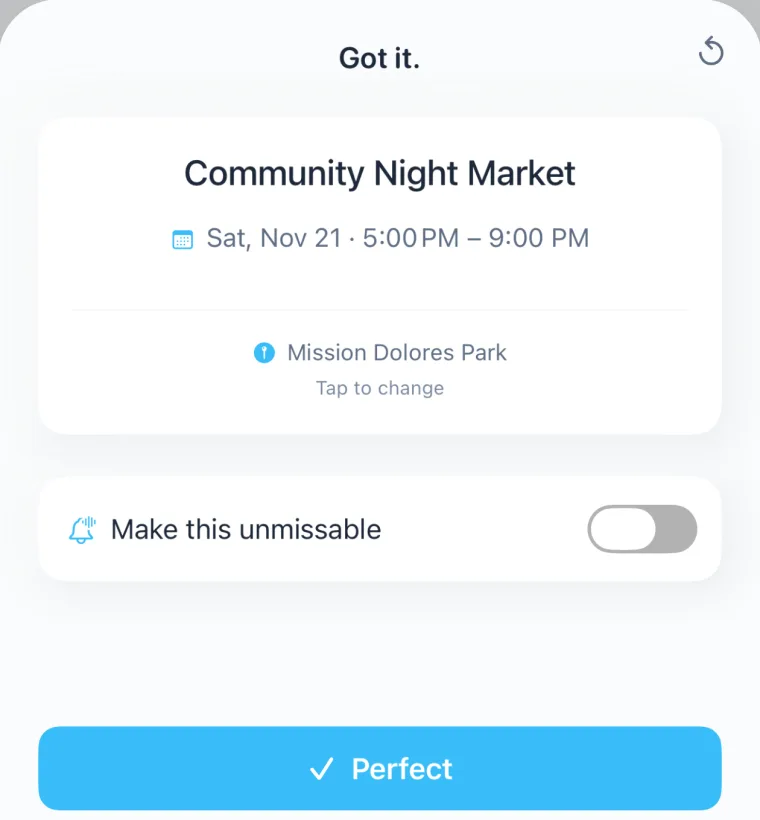
Take a photo of a flyer, or a screenshot of a booking email, an invitation or a ticket. Composed reads the date, time and place and shows you what it found. Tap Perfect to confirm.
For the ones you cannot miss, switch on Unmissable: on iOS 26 it rings like an alarm, through Silent and Focus, until you stop it.
Confirm.
Get it done.
To-dos and deadlines sit with your plans.
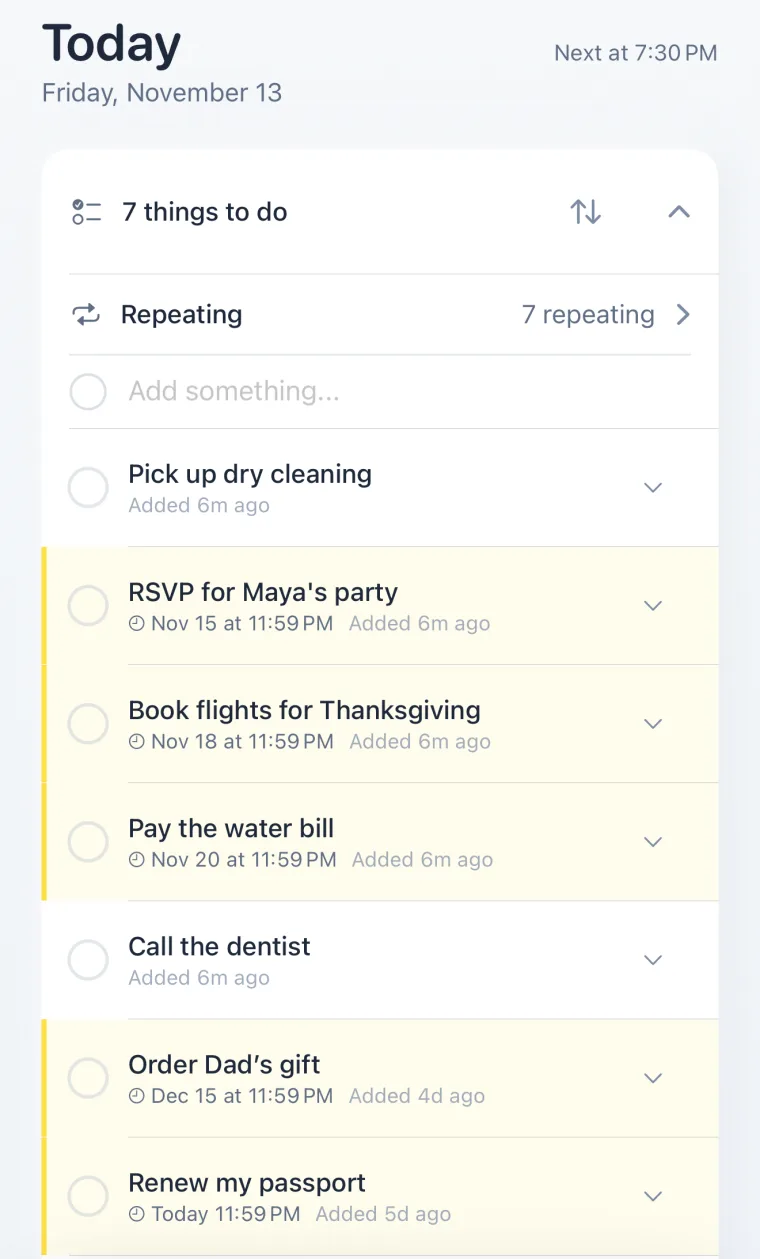
Things to do live on the same page as your calendar, not in a second app. Some have a due date and show as deadlines in yellow; some are for anytime. Nothing is ever marked late. It just stays in sight until it’s done.
Nothing slips.
Set it once.
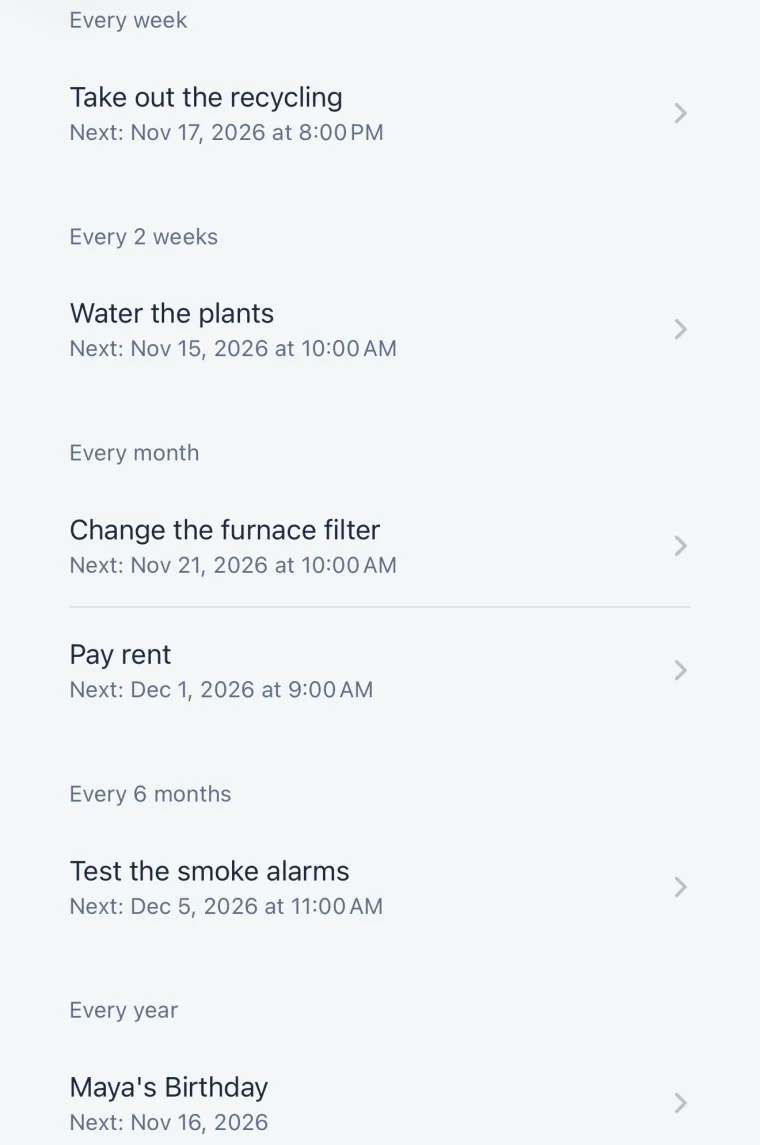
Weekly. Monthly. Twice a year. The upkeep nobody remembers, remembered.
Say “change the furnace filter every month” or “test the smoke alarms every six months” once. Every repeating thing sits in one list with its next date, and comes back on its own when it is due.
Change the furnace filter. Every month. For good.
Keep it.
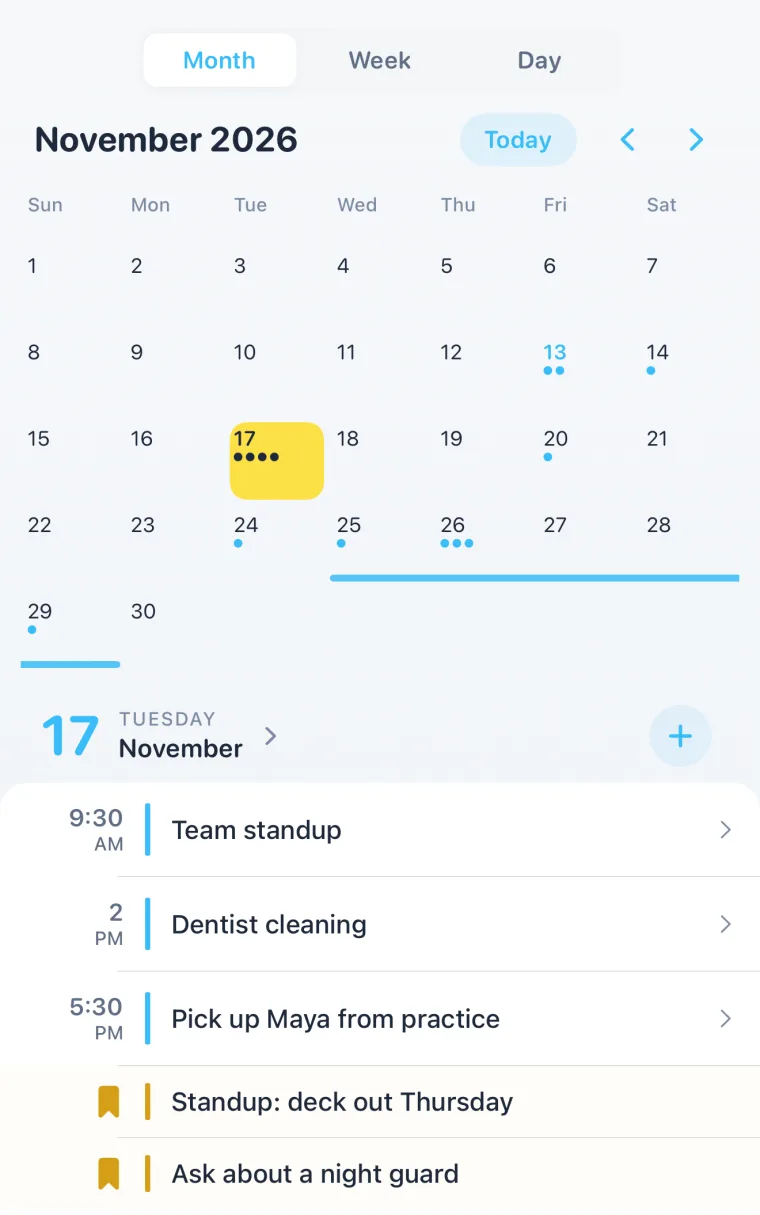
Notes stay on the day you wrote them.
Tap any day in Month view to see its plans and the notes you wrote that day. A note added to an event lives in Notes too, and stays after the event is over, so “ask about a night guard” is still there at the next appointment.
Your days, with your notes.
Works with your stuff.
Keep your calendars. Composed makes them smarter.
- Google CalendarSyncs both ways
- Apple CalendarSyncs both ways
- Google MapsFinds any place
- Apple MapsDrive times for leave-by
- Apple WatchReminders on your wrist
- WidgetsNext up on your Home Screen
- Siri“Hey Siri, plan with Composed.”
- Live ActivitiesYour drive, live on the Lock Screen
Questions
- What is Composed?
- Composed is an AI calendar for iPhone and iPad. You say, snap or type a plan once; it puts it on the right day with the place attached, reminds you, and tells you when to leave. To-dos, deadlines, birthdays and notes live in the same app, connected to your calendar.
- Does Composed replace Google Calendar or Apple Calendar?
- No, it works with them. Composed syncs with Google Calendar and Apple Calendar both ways, so you keep your calendars and the people you share them with, and Composed adds the reminders, leave-by times and to-dos on top.
- How does Composed know when I should leave?
- It finds the place for each plan and, with your permission, uses your real-time location to work out the drive. For flights it adds time for check-in and security. If you move, the leave-by time moves with you.
- Can I add things without typing?
- Yes. Say “Hey Siri, plan with Composed” and speak the plan, or take a photo or screenshot of a flyer, booking or invitation. Composed reads the date, time and place and asks you to confirm.
- Is Composed free?
- Composed is free to download with every feature for up to 5 active items you add. Calendar imports and birthdays don’t count toward the 5. Composed Pro removes the limit.
More on each part: voice to calendar, leave on time, screenshot import, smart reminders, Google and Apple Calendar, to-dos and deadlines, repeating reminders, notes, widgets, Apple Watch and Live Activities and birthdays and occasions.