Skip to content

Voice to Calendar

Voice-to-calendar
on iPhone.

Say it the way you'd say it out loud. Composed handles the rest.

Composed is a voice-first planner for iPhone. Speak a sentence like "Dentist Tuesday at 2pm in Shibuya," and Composed uses Apple's on-device Speech framework to transcribe in real time, then builds the calendar event — with the place attached, prep tasks generated, and a leave-by time calculated. Syncs both directions with Apple Calendar and Google Calendar. Five events free.

Get Composed — Free 5 events to start. Calendar imports don't count.
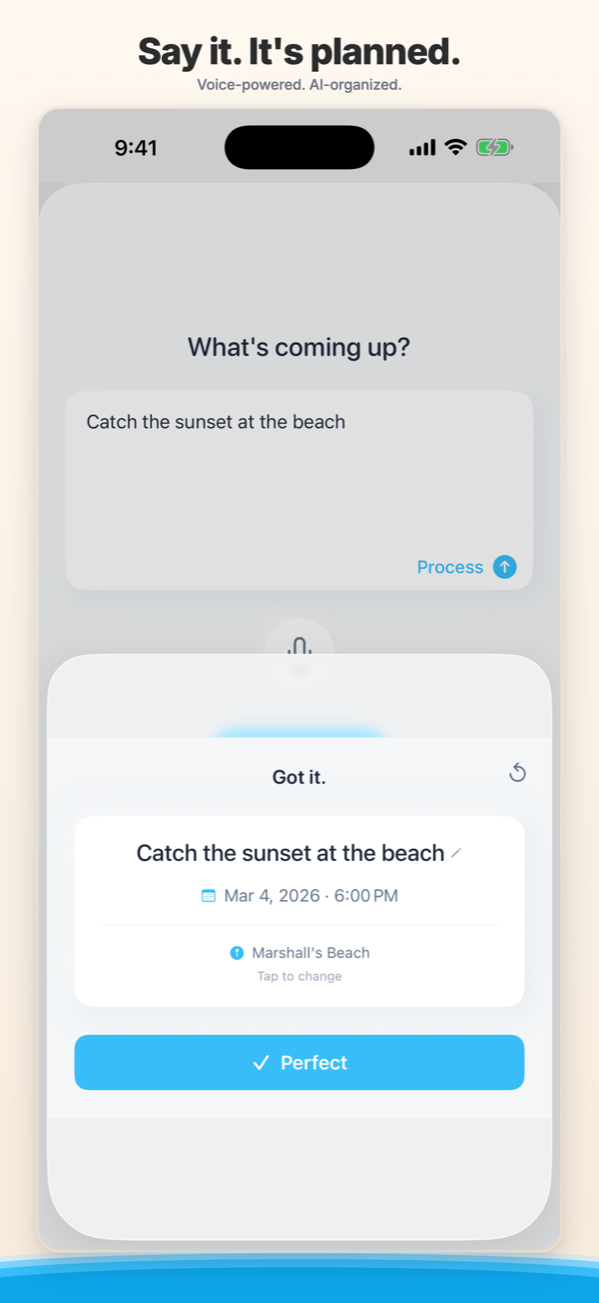
Composed voice-to-calendar screen — speak a plan, Composed transcribes and builds the event

The definition

What is voice-to-calendar on iPhone?

Voice-to-calendar is the act of speaking a full natural-language event — date, time, place, and intent in one breath — and having an app parse the sentence, build a structured calendar entry, and write it to your iPhone's calendar without typing or follow-up prompts. Composed handles this with Apple's on-device Speech framework for transcription and a language model for event extraction, then syncs the result to Apple Calendar and Google Calendar.

That sentence does a lot of work. The "natural-language" part means you do not need to learn a command vocabulary — you say "Coffee with Maya at Stumptown Friday at 10" the same way you would say it to your partner. The "one breath" part means the parser handles date, time, place, recurrence, and implied tasks as a single utterance instead of asking three follow-up questions. The "structured entry" part means the result is a real calendar event with a real title, real time, real location, and real reminders — not a freeform note you have to clean up later.

Dictation

Voice as a keyboard

Apple Calendar and most stock apps treat voice as a typing substitute. You speak; words appear. You still have to tap fields, pick a time, set a date, choose a calendar.

Voice commands

Siri-style triggers

Siri and Google Assistant respond to structured commands. They work well for short, unambiguous requests and tend to ask follow-up questions when the sentence carries place, recurrence, or partial information.

Voice-to-event

What Composed does

Composed takes the whole sentence — date, time, place, intent, recurrence — and writes a structured event in one shot. The same input produces the calendar entry, the prep checklist, the place, and the leave-by time.

What you can say

Fifteen sentences. Fifteen calendar entries.

Composed handles the everyday — errands, meetings, friends, family, travel, recurring routines, multi-day stays. Each row below shows exactly what Composed extracts from the spoken sentence on the left.

You say

“Dentist Tuesday at 2pm in Shibuya.”

Event

Dentist appointment

Tuesday

Time

2:00 pm

Shibuya

Detail

Prep: bring insurance card. Leave by 1:32 pm.

You say

“Flight to LAX Friday morning, arrive at the gate by 8.”

Event

Flight to LAX

Friday

Time

8:00 am gate arrival

LAX

Detail

Departure tracking with airport buffer.

You say

“Pick up Sarah from JFK at 6:30 next Wednesday.”

Event

Pickup — Sarah

next Wednesday

Time

6:30 pm

JFK

Detail

Real-time travel from your location.

You say

“Coffee with Maya at Stumptown Friday at 10.”

Event

Coffee with Maya

Friday

Time

10:00 am

Stumptown Coffee

Detail

Place matched from your area, address attached.

You say

“Mom's birthday dinner next Saturday at 7 in the West Village.”

Event

Birthday dinner — Mom

next Saturday

Time

7:00 pm

West Village

Detail

Place discovery surfaces a calm shortlist.

You say

“Standup every Tuesday and Thursday at 9.”

Event

Standup

Tue + Thu, recurring

Time

9:00 am

Detail

Recurrence detected from "every".

You say

“Annual review with Priya April 8th at 11.”

Event

Annual review — Priya

April 8

Time

11:00 am

Detail

Prep: review prior quarter notes.

You say

“Pick up the dry cleaning before 6 today.”

Event

Pick up dry cleaning

today

Time

before 6:00 pm

Detail

Filed as a floating task, no clock pressure.

You say

“Soccer practice for Jacob Mondays at 5:30 at the Lincoln Field.”

Event

Jacob — soccer practice

Mondays, recurring

Time

5:30 pm

Lincoln Field

Detail

Departure alert factors in afternoon traffic.

You say

“Therapist Wednesday at noon.”

Event

Therapy

Wednesday

Time

12:00 pm

Detail

Quiet reminder ten minutes before.

You say

“Hotel check-in Friday, check-out Sunday at the Ace in New Orleans.”

Event

Hotel — Ace, New Orleans

Fri → Sun

Time

multi-day stay

New Orleans

Detail

Spans both days on your timeline.

You say

“Drop the car at the shop tomorrow morning, pick it up by 5.”

Event

Car service

tomorrow

Time

morning drop, 5:00 pm pickup

Detail

Two related tasks linked under one event.

You say

“Parent-teacher conference Thursday the 14th at 3:15 in room 204.”

Event

Parent-teacher conference

Thu Mar 14

Time

3:15 pm

Room 204

Detail

Prep: questions for the teacher.

You say

“Wedding rehearsal at 5 on Friday, dinner at 7 at Lilia.”

Event

Rehearsal + dinner

Friday

Time

5:00 pm, 7:00 pm

Lilia

Detail

Two linked events, single utterance.

You say

“Take meds tonight at 10.”

Event

Take medication

tonight

Time

10:00 pm

Detail

Calm reminder, no red badge, no guilt.

Composed treats partial input as partial. If you only said a date, the time stays open instead of being filled in with a guess.

Where it fits

Composed vs Siri vs Google Assistant vs Apple Calendar dictation.

Every voice-to-event tool on iPhone solves a slightly different problem. The table below maps what each one actually does today, so you can pick the one that matches how you plan. The short version: Siri and Google Assistant are great general-purpose voice assistants but lean on structured commands, Apple Calendar dictation is a faster keyboard but not a parser, and Composed is built specifically to take one natural-language sentence and turn it into a complete, ready-to-leave event.

Capability Composed Siri Google Assistant Apple Calendar dictation
Open without a wake word tap-to-talk requires "Hey Siri" or hold requires "Hey Google" or button tap mic
Full-sentence natural language limited; often asks follow-ups limited; structured commands work best transcribes only, no parsing
Extract a specific location with place discovery if you say the exact address if you say the exact name
Generate AI prep tasks
Calculate when to leave with live traffic basic, when location is set basic, when location is set
On-device speech recognition Apple Speech cloud-first
Reads + writes Apple Calendar two-way writes only via Google Calendar sync
Free for everyday use 5 events free

Why voice-first

Voice is the planner you can use while your hands are full.

The reason voice-to-calendar matters is the same reason planning fails in the first place — the right moment to add the event is rarely the right moment to open the app, tap the date picker, choose the calendar, set the time, and pick a category. The moment is somewhere between the doctor's office and the parking lot, or in the kitchen with a kid on each hip, or walking out the door with the dog leash in one hand and a coffee in the other. Voice closes the gap between thinking of the plan and capturing it.

In the car

Hands stay on the wheel

Heard a soccer practice change in the carpool line. Speak it before you forget. Composed captures the new time, attaches the field, and recalculates the leave-by reminder for next Monday's practice.

Walking out the door

Three seconds, one sentence

"Pick up the dry cleaning before 6." Composed files it as a floating task with a calm reminder, no time anxiety, no red badge — just a quiet check-in mid-afternoon while you have a moment.

After a phone call

Capture before the context fades

Doctor's office calls to confirm Thursday at 9:15. Hang up, hold the microphone, say it out loud. The appointment, the time, and the address from your last visit all land on the calendar before you finish your next sip of coffee.

Living with ADHD

Working memory, off the hook

The hardest part of planning with ADHD is the gap between knowing and capturing. Voice cuts the gap to one sentence. Composed's three-layer reminders pick up from there — aware, ready, time to go — without overdue labels or red badges that make a bad day worse.

Composed was built for the moments planning actually happens — the in-between minutes, not the dedicated planning session that rarely arrives. The bar for voice-to-calendar is that you say the thing once, the way you'd say it to a friend, and it's handled. If you have to repeat yourself, simplify the sentence, or rephrase to match a command syntax, the tool has failed the moment. That bar is what Composed is built around.

Who it's for

Built for the people who plan in motion.

Voice-to-calendar is not a feature for everyone — it's the right answer for a specific kind of planner. If you recognize yourself in any of the descriptions below, Composed is built for the way you already think.

Parents juggling a family calendar

Pediatrician changes, parent-teacher conferences, soccer practices, dance recitals, picture day. Family schedules generate more events per week than most calendars are designed to absorb. Voice lets you capture them in the moment they're announced — in the parking lot, on the school steps, mid-cooking — instead of writing them on a Post-it that gets lost in a coat pocket.

Frequent travelers and remote workers

Flights, hotel check-ins, meeting blocks across time zones, dinners in a new city. Voice carries the date, time, and place into Composed in one breath. Departure tracking handles the airport buffer for flights and the live-traffic drive for everything else, so you stop running the math in your head every morning.

People with ADHD and time blindness

The combination of voice input, AI prep tasks, and a calm three-layer reminder system is built specifically for working-memory aid. The shortest path from "I need to remember this" to "it's captured" is a one-sentence voice memo. The shortest path from "I need to be ready" to "I'm leaving on time" is a leave-by alert that does the travel math for you.

Anyone who hates typing on a small screen

Typing a full event into Apple Calendar — title, date, time, location, alert — takes between thirty and ninety seconds depending on how many fields you tab through. Speaking the same event takes about four. The math is unambiguous. Voice-to-calendar exists because the original calendar UX is faster as a sentence than as a form.

How it works

How does voice-to-calendar work on iPhone?

Voice-to-calendar in Composed runs as a five-stage pipeline: Apple's on-device Speech framework transcribes the audio in real time, a Claude-based parser extracts the event from the sentence, the result is structured into a calendar entry, an optional place is matched from nearby venues, and a leave-by time is calculated from live travel data. The whole sequence finishes in roughly the time it takes you to set the phone down.

  1. 1

    On-device transcription

    You tap the microphone and speak. Apple's on-device Speech framework streams the transcription word-by-word to the screen so you can see what Composed is hearing as you talk. The audio stays on the iPhone — nothing is recorded, nothing is uploaded.

  2. 2

    Natural-language event extraction

    The transcript is parsed by a Claude-based extractor that pulls out the event title, date, time, location, recurrence, and any tasks implied by the sentence. Partial input stays partial. Ambiguous input is flagged so you can confirm rather than guessed.

  3. 3

    Place discovery

    If you mentioned a place by name or said something like "the dentist" or "dinner Saturday," Composed searches nearby venues and surfaces a short, calm list ranked by relevance and rating. You confirm with a tap, and the place is attached to the event with its address and hours.

  4. 4

    Prep checklist

    Composed generates a short prep checklist based on what kind of event you described — bring the insurance card to the dentist, charge the camera before the trip, pick up a card before the birthday. You add or remove items with one tap.

  5. 5

    Departure tracking

    For events with a location, Composed calculates real-time travel from where you are and sends a gentle "time to leave" reminder factoring in live traffic. For flights, the leave-by math includes the airport check-in and security buffer, so you do not arrive at the gate with thirty-one minutes to spare. Always confirm flight times with your airline.

Privacy

Composed never records or stores voice audio. On-device transcription means the audio stream stays on your iPhone. Only the resulting text is parsed, and your events are stored with row-level security so only you can read your own data. There is no advertising tracker, no resold profile, no audio archive.

Common questions

Voice-to-calendar,
in five questions.

Can I add events to my calendar by speaking?

Yes. Composed is built around voice as the primary input — you say a plan in natural language, and Composed parses the date, time, location, and intent, then writes the event to its calendar (and to Apple Calendar or Google Calendar if you have sync enabled). You do not need to chain Siri shortcuts, dictate punctuation, or open a separate dictation field.

What is the best voice planner app for iPhone?

For natural-language voice-to-event capture, Composed is built specifically for the use case — it understands phrases like "Dentist Tuesday at 2pm in Shibuya" without needing trigger words, command syntax, or follow-up prompts. Apple Calendar dictation supports voice input but treats speech as raw text, not as a parsed event. Siri can create events but typically requires a structured back-and-forth and does not generate prep tasks or place suggestions.

Does Composed work with Siri?

Composed has its own dedicated voice button so you do not have to invoke Siri at all — you open the app, tap the microphone, and speak. Composed also reads from and writes to Apple Calendar, so any events Siri creates appear in Composed, and any events you speak into Composed appear in Apple Calendar and on every device synced to it.

Is voice-to-calendar private?

Composed uses Apple's on-device speech recognition for real-time transcription, which means the audio stream stays on your iPhone. Composed does not record or store voice audio. When the optional cloud refinement pass is enabled, only the resulting text is sent for natural-language parsing — never the raw audio. Your events are protected by row-level security in our database, so only you can read your own data.

Can Composed extract dates and times from natural speech?

Yes. Composed handles relative dates ("next Wednesday", "in three weeks", "the 14th"), partial times ("morning", "before 6"), recurrence ("every Tuesday and Thursday"), multi-day spans ("check-in Friday, check-out Sunday"), and locations both specific ("Stumptown Coffee on Ave A") and approximate ("somewhere in the West Village"). It treats partial input as partial — if you only said a date, Composed leaves the time open instead of guessing.

Start with one event you'd say out loud.

Five events free. Calendar imports don't count toward the five. Speak the first one — Composed will handle the rest of the day.

Get Composed — Free 5 events to start. Calendar imports don't count.