The short answer: for most people, the reminder app already on the iPhone is enough. Apple Reminders is free, understands a typed phrase like “Jog every other morning”, reminds you at a time or when you arrive somewhere, and since iOS 26.2 it can ring a reminder as an alarm. Look further when one particular thing keeps going wrong: you swipe reminders away and forget them (Due), you want habits and a focus timer in the same app (TickTick), or what you forget is appointments and getting there on time (Composed).
A note first: we make Composed, one of the seven apps below. Every detail about another app comes from its own App Store listing or its maker’s site, and each card links to its source. We say where Composed fits, where it doesn’t, and which app to pick instead.
The quick pick
- You want free and built in, for everyday lists: Apple Reminders.
- You swipe reminders away and then forget them: Due. A missed reminder keeps coming back until you deal with it.
- You want reminders, habits and a focus timer in one free app: TickTick.
- You run projects or share tasks with other people: Todoist.
- You’d rather pay once for a polished to-do list: Things 3.
- Your reminders sit beside a busy calendar and you type everything as a sentence: Fantastical.
- You forget appointments, or leave too close to the start time: Composed. Say “dentist Thursday at 2pm” and the reminders and the time to leave are set for you.
Reminder apps for iPhone, compared
Apple Reminders by Apple
- What it is
- The reminders app already on your iPhone: lists with dates, repeats, tags, subtasks and shared lists
- How it reminds you
- At a time, on a repeat, or when you arrive at or leave a place. Since iOS 26.2 a reminder can ring as an alarm that sounds even when the phone is silenced or a Focus is on
- Free
- Everything, already installed
- Paid
- Nothing to buy
- Runs on
- iPhone, iPad, Mac, Apple Vision Pro, synced with iCloud
- Good for
- Most everyday reminders, typed in plain words: "Jog every other morning" sets the repeat for you
- Worth knowing
- Alarms for reminders need iOS 26.2 or later, and ring only on the device Find My uses as your location
Due by Due Apps
- What it is
- A reminder and timer app built to be hard to ignore: a missed reminder keeps coming back until you act on it
- How it reminds you
- At a time you pick, with 12 one-tap preset times, or as a countdown timer. Auto Snooze repeats a missed reminder every 1, 5, 10, 15, 30 or 60 minutes. Critical Alerts get through Silent mode and Focus, and Prominent Alerts ring like an alarm until you act
- Free
- No free version
- Paid
- $7.99 once, including every feature released in your first year. An optional Upgrade Pass, $4.99 a year, adds features released after that. Due for Mac is sold separately
- Runs on
- iPhone, iPad, Apple Watch, with Mac sold separately. No account needed
- Good for
- Reminders you keep swiping away: Auto Snooze repeats a missed one until you mark it done or reschedule it
- Worth knowing
- Auto Snooze repeats 5 times by default, up to 10. Ringing like an alarm (Prominent Alerts) needs iOS 26 or later
TickTick by Appest
- What it is
- A to-do list with a calendar, a habit tracker and a focus timer in one app
- How it reminds you
- At a time or place, with up to 5 reminders on one task on Premium
- Free
- Tasks, checklists, recurring tasks, reminders by time or place, a Pomo timer and habits. Its listing says "TickTick is always free"
- Paid
- Premium adds calendar subscriptions, full calendar views, up to 5 reminders per task and up to 299 habits. $4.99 a month or $49.99 a year
- Runs on
- iPhone, iPad, Apple Watch
- Good for
- One app for tasks, habits and focus sessions
- Worth knowing
- Subscribing to your other calendars is a Premium feature
Todoist by Doist
- What it is
- A task manager organized by project, with fast typed or spoken entry
- How it reminds you
- A reminder when a task is due, on every plan. Pro adds custom reminder times, several reminders per task, and reminders set off by a location
- Free
- The Beginner plan: 5 personal projects, Quick Add, task reminders, and list and board layouts
- Paid
- Todoist Pro adds the calendar layout, task durations and 300 projects. $6.99 a month or $59.99 a year on the App Store, with a 7-day Pro trial
- Runs on
- iPhone, iPad, Apple Watch and Mac, plus the browser
- Good for
- Running many projects at once, alone or with other people
- Worth knowing
- The calendar layout is a Pro feature
Things 3 by Cultured Code
- What it is
- A to-do app built around Today and Upcoming lists, with projects and areas
- How it reminds you
- A time you set on a to-do; type "Wed 8pm" and it reads the time. Repeating to-dos on a schedule you choose
- Free
- No free version on iPhone
- Paid
- $9.99 once for iPhone and Apple Watch, with no in-app purchases. The Mac, iPad and Vision Pro apps are sold separately
- Runs on
- iPhone, Apple Watch
- Good for
- Paying once and owning it: a polished to-do list that also shows your calendar events
- Worth knowing
- Each device family is its own purchase
Fantastical by Flexibits
- What it is
- A calendar you type or dictate into: a sentence like "Lunch with John at 123 Main Street on Tuesday" becomes an event
- How it reminds you
- Type the alert into the sentence ("alert 1 hour before", "alarm 3PM"); tasks can go off at a time or when you arrive or leave a place. Time-to-leave notifications and default alerts are part of Premium
- Free
- A calendar for basic events, with day, week, month, quarter and year views, tasks from Reminders, Todoist and Google Tasks, and a 3-day forecast
- Paid
- Flexibits Premium adds time-to-leave notifications from travel time, meeting polls, booking from your availability and calendar sets. $6.99 a month or $56.99 a year on the App Store, with a 14-day free trial
- Runs on
- iPhone, iPad, Apple Watch, Mac, Apple Vision Pro, Windows
- Good for
- Typing plans as sentences, and seeing iCloud, Google and Exchange calendars in one polished view
- Worth knowing
- Time-to-leave notifications are part of Premium
Composed by us
- What it is
- AI that schedules and reminds you: say or type "dentist Thursday at 2pm", or snap a screenshot of a booking, and it becomes an event with its reminders set and, when it has a place, a time to leave
- How it reminds you
- Set for you from the kind of event, with a "Fewer reminders" switch. An event with a place gets a leave-by reminder from live traffic. "Make this unmissable" rings like a Clock alarm until you stop it, even on Silent (iOS 26 or later). Events imported from Apple or Google Calendar get reminders too
- Free
- Every feature, for up to 5 active items you add yourself. Events imported from Apple Calendar or Google Calendar do not count
- Paid
- Pro removes the 5-item limit: $5.99 a month, $39.99 a year with a 7-day free trial, or $199 once
- Runs on
- iPhone and iPad
- Good for
- Appointments and plans at a place: reminded at the right times and told when to leave, on top of the calendar you already have
- Worth knowing
- You cannot pick exact reminder times or be reminded when you arrive somewhere. No projects, tags or priority levels, and no Android, Mac or web version
Other apps' details come from their own App Store listings and their makers' pricing and product pages, checked November 11, 2026. Prices are US prices. Prices and features change; the maker's page is the final word.
When Apple Reminders is enough
If your reminders are mostly lists and dates, start here before downloading anything. Reminders repeats daily, weekly or at a custom interval, can go off when you arrive at home or work or get in your car, and keeps tags, subtasks, templates and shared lists you can assign to people. Siri adds reminders by voice.
The usual reason to leave it was a reminder you couldn’t miss. Since iOS 26.2, Reminders can schedule an alarm for a reminder, and Apple says alarms sound “even when your device is silenced or a Focus is on”. Apple’s support page shows where to switch it on. The alarm rings only on the device Find My uses as your location, so if you carry an iPhone and an iPad, check which one that is.
When Due is worth $7.99
Due is built around one problem: a reminder goes off, gets swiped away, and is forgotten. Its Auto Snooze repeats a missed reminder every 1 to 60 minutes until you mark it done or reschedule it, 5 times by default and up to 10. Critical Alerts get through Silent mode and Focus, and on iOS 26 or later Prominent Alerts ring like an alarm until you act. Type “Dentist 3p Thu” and it spots the date.
It costs $7.99 once and needs no account. An optional Upgrade Pass, $4.99 a year, adds features released after your first year, and the Mac app is a separate purchase. If what you want is an app that keeps at you until you do the thing, try this one first.
Where Composed fits
Composed isn’t a to-do list or a planner. It’s AI that takes the setup out of being reminded. Say or type “dentist Thursday at 2pm” and it’s on your schedule with its reminders set; you don’t choose the times. Give it a place and it works out when you need to leave from traffic, reminds you then, and shows a countdown on the Lock Screen and Dynamic Island.
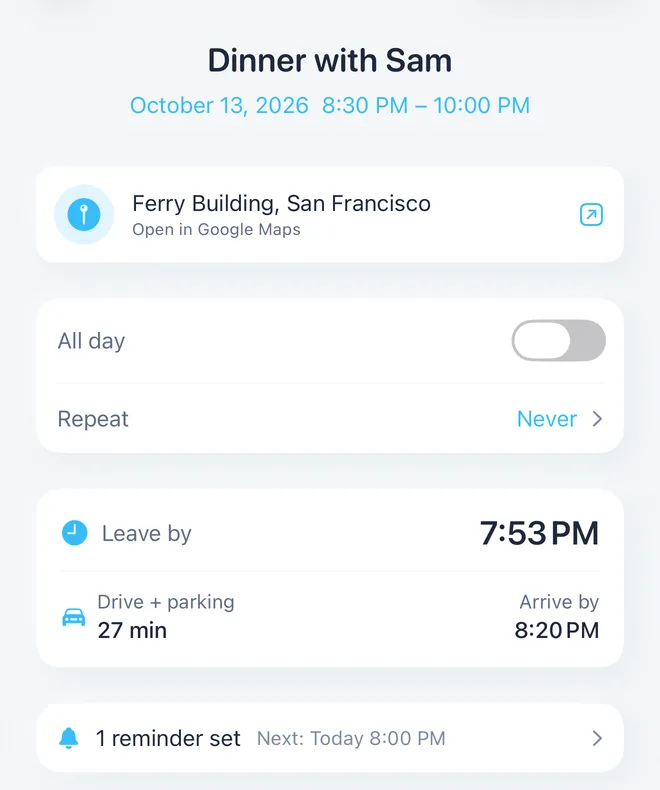
A real screen from Composed, captured on the iPhone simulator from version 1.9.4 in October 2026. The time to leave is the app’s own calculation from traffic at that moment.
What that looks like day to day:
- Your calendar comes with you. Composed reads Apple Calendar and Google Calendar, and those appointments get reminders and a time to leave too. Imported events don’t count toward the free plan’s 5 active items.
- Unmissable when you want it. Switch on “Make this unmissable” for one event and, on iOS 26 or later, it rings like a Clock alarm until you stop it, even on Silent. For an event with a place it rings at your time to leave.
- It reads what you’d otherwise retype. A screenshot of a flight or hotel confirmation becomes a trip with check-in and boarding reminders, for you to check before saving. Birthdays get reminders every year, from a month ahead to the day.
It’s free for 5 active items you add yourself. Composed Pro removes the limit: $5.99 a month, $39.99 a year with a 7-day free trial, or $199 once for the Founder Edition. How the reminders are spaced is on the smart reminders page.
Where Composed is the wrong pick
- You want to choose when you’re reminded. Composed sets the timing from the kind of event. You can ask for fewer reminders, but not pick an exact time or add several to one item. Apple Reminders, Due and TickTick let you.
- You want a reminder when you get somewhere. “Remind me when I get home” works in Apple Reminders, TickTick and Todoist Pro. Composed has no place-triggered reminders.
- Your reminders are mostly lists. Groceries, projects, tags and shared lists are what Reminders, Todoist and Things are built for. Composed has no projects, tags or priority levels.
- You need any reminder to repeat until you act. Composed’s “Keep reminding me until it’s done” covers to-dos due at a set time, with check-ins through the day. Due’s Auto Snooze does it for every reminder.
- You use a Mac, an Android phone or the web. Composed runs on iPhone and iPad.
If you’re deciding between Composed and the app you already have, the Apple Reminders comparison goes into more detail, and the calendar app comparison covers the calendar side.
What to look for in a reminder app
How it gets your attention when it matters. A banner is easy to miss. Check whether the app can ring as an alarm or get through Silent mode, and whether you can keep that for the few things that need it.
What happens after you miss one. Some apps remind you once and wait. Due’s Auto Snooze keeps going until you act, and Composed’s “Make this unmissable” rings until you stop it.
How fast it is to add one. If adding a reminder takes more than a sentence, you’ll put it off. Apple Reminders, Due, Todoist, Things, Fantastical and Composed all read dates from what you type.
Where your appointments already are. If they live in a calendar, an app that reads it saves you entering them twice. Fantastical and Composed both read your calendars, and Apple Calendar’s own alerts and time-to-leave notifications may be all you need.
Reminder apps for iPhone: common questions
What is the best reminder app for iPhone?
It depends on what goes wrong. For most everyday reminders, Apple Reminders: it's free, already installed, and since iOS 26.2 it can ring a reminder as an alarm. If you swipe reminders away and forget them, Due ($7.99 once) repeats a missed reminder until you act. If you forget appointments or leave too close to the start, Composed sets the reminders and a time to leave from one sentence.
What is the best free reminder app for iPhone?
Apple Reminders, which is already on your iPhone and costs nothing. TickTick's listing says it is "always free", with reminders by time or place, habits and a focus timer; Premium is $4.99 a month or $49.99 a year. Composed is free for 5 active items you add, and appointments imported from your calendar don't count toward that.
Can an iPhone reminder ring like an alarm?
Yes. Since iOS 26.2, Apple Reminders can schedule an alarm for a reminder, and it sounds even when the phone is silenced or a Focus is on. Due's Prominent Alerts ring like an alarm on iOS 26 or later, and Composed's "Make this unmissable" rings like a Clock alarm for one event, on iOS 26 or later.
How do I set a recurring reminder on iPhone?
In Apple Reminders, type the repeat into the reminder, for example "Jog every other morning", or set it to repeat daily, weekly or at a custom interval in the reminder's details. Due, TickTick, Todoist and Things 3 also repeat reminders on a schedule you choose.
Is Apple Reminders a good to-do list?
For most personal lists, yes. It has tags, subtasks, templates, shared lists you can assign to people, and grocery lists that sort themselves into sections. If you run many projects, Todoist (5 projects free, 300 on Pro) or Things 3 ($9.99 once on iPhone) are built for that.
What's the difference between TickTick and Apple Reminders?
Both are free to start. TickTick adds a habit tracker, a Pomo focus timer and calendar views in the same app, and its Premium plan adds up to 5 reminders per task. Apple Reminders is already installed, syncs through iCloud and, since iOS 26.2, can ring a reminder as an alarm.
Which app helps if I keep forgetting appointments?
Start with what you have: in Apple Calendar, add a location to an event and it can notify you when it's time to leave. If you want the reminders set for you, Composed reads your Apple or Google Calendar, reminds you about each appointment, and works out when to leave from traffic. A new one takes one sentence, such as "dentist Thursday at 2pm".
Is there a good reminder app for ADHD?
Look for reminders that don't stop at one notification. Due repeats a missed reminder until you act, and Apple Reminders can ring a reminder as an alarm. If the hard part is getting out the door on time, Composed works out when to leave and reminds you then. None of these is a treatment; pick the one that fixes the step you lose track of.