The short answer: there is no single best planner app for iPhone, because “planner” means three different things. Some people want a calendar that plans the day around events. Some want a to-do list. Some want the whole day drawn as a timeline. Pick the kind first, then look at what the free version really includes, because that is where these apps differ most.
A note before the list: we make Composed, one of the eight options below. We have tried to write the page we would want to read if we didn’t. That means saying where Composed fits, where it doesn’t, and which app to pick instead. Every detail about another app comes from its own App Store listing, its maker’s pricing page, or Apple’s own guide, and each one links to its source.
The quick pick
- You want free, with nothing to install: Apple Calendar and Reminders, already on your iPhone.
- You want free with no paid tier at all: Microsoft To Do.
- You want to pay once and never subscribe: Things 3, at $9.99 for iPhone.
- You want your day laid out as a timeline: Structured.
- You run a lot of projects, alone or with other people: Todoist.
- You want tasks, habits and a focus timer in one app: TickTick.
- Your bookings already arrive in Gmail: Google Calendar.
- You want to say a plan out loud and be told what to bring and when to leave: Composed.
Every option, compared
Composed by us
- What it is
- A planner you talk to: say or type a plan, or snap a screenshot of a booking, and it becomes an event with reminders, prep when the event calls for it, and a time to leave
- Free
- Every feature, for up to 5 active items you add yourself. Events imported from Apple Calendar or Google Calendar do not count
- Paid
- Pro removes the 5-item limit: $5.99 a month, $39.99 a year with a 7-day free trial, or $199 once
- Runs on
- iPhone
- Good for
- Appointments, trips and occasions you want to arrive at prepared and on time
- Worth knowing
- No projects, tags or priority levels, and no Android, iPad, Mac or web version
Apple Calendar + Reminders by Apple
- What it is
- The two apps already on your iPhone. Calendar shows your iCloud, Google and Exchange calendars together, and can show, create and complete your scheduled reminders
- Free
- Everything, already installed
- Paid
- Nothing to buy
- Runs on
- iPhone, iPad, Apple Watch, Mac
- Good for
- Starting with no download. Add a location to an event and Calendar tells you when it is time to leave
- Worth knowing
- Reminders only appear in Calendar after you select Scheduled Reminders in the calendar list
Structured by unorderly
- What it is
- Your day as one visual timeline that you drag tasks onto
- Free
- The timeline planner, an inbox, sub-tasks and notes, a Pomodoro focus timer, widgets, and sync across your Apple devices
- Paid
- Structured Pro adds calendar and Reminders import, recurring tasks, AI day planning and automatic replanning. Monthly or yearly subscription, or $99.99 once
- Runs on
- iPhone, iPad, Mac, Apple Watch
- Good for
- Time blocking: seeing the whole day in order, hour by hour
- Worth knowing
- Connecting your calendars and repeating tasks are both part of Pro
Todoist by Doist
- What it is
- A task manager organized by project, with fast typed or spoken entry
- Free
- The Beginner plan: 5 personal projects, Quick Add, task reminders, and list and board layouts
- Paid
- Todoist Pro adds the calendar layout, task durations and 300 projects. $6.99 a month or $59.99 a year on the App Store, with a 7-day Pro trial
- Runs on
- iPhone, iPad, Apple Watch and Mac, plus the browser
- Good for
- Running many projects at once, alone or with other people
- Worth knowing
- The calendar layout is a Pro feature
TickTick by Appest
- What it is
- A to-do list with a calendar, a habit tracker and a focus timer in one app
- Free
- Tasks, checklists, recurring tasks, reminders, a Pomo timer and habits. Its listing says "TickTick is always free"
- Paid
- Premium adds calendar subscriptions, the grid calendar view, more than 5 habits, and up to 5 reminders per task. $4.99 a month or $49.99 a year
- Runs on
- iPhone, iPad, Apple Watch
- Good for
- One app for tasks, habits and focus sessions
- Worth knowing
- Subscribing to your other calendars is a Premium feature
Things 3 by Cultured Code
- What it is
- A to-do app built around Today and Upcoming lists, with projects and areas
- Free
- No free version on iPhone
- Paid
- $9.99 once for iPhone and Apple Watch, with no in-app purchases. The Mac, iPad and Vision Pro apps are sold separately
- Runs on
- iPhone, Apple Watch
- Good for
- Paying once and owning it: a polished to-do list that also shows your calendar events
- Worth knowing
- Each device family is its own purchase
Microsoft To Do by Microsoft
- What it is
- To-do lists with My Day, a daily list it suggests tasks for
- Free
- Everything. The listing shows no in-app purchases and says "To Do is free and available on all your devices"
- Paid
- Nothing to buy
- Runs on
- iPhone, iPad, Apple Watch
- Good for
- A free daily list, especially if your work runs on Outlook
- Worth knowing
- It is a list app. Your calendar stays in another app
Google Calendar by Google
- What it is
- A calendar with tasks alongside your events
- Free
- The calendar itself: events, tasks, shared calendars, and reservations added from Gmail
- Paid
- The in-app purchases on its listing are Google storage and AI plans
- Runs on
- iPhone, iPad, Apple Watch, plus the web and Android
- Good for
- People already in Gmail: flights, hotels and restaurant bookings land on the calendar by themselves
- Worth knowing
- Tasks are a simple list beside your events
Other apps' details come from their own App Store listings and their makers' pricing and product pages, checked October 14, 2026. Prices are US prices. Prices and features change; the maker's page is the final word.
If you don’t want a subscription
Three of the eight never ask for one.
- Apple Calendar and Reminders come with the phone. Apple’s guide says you can “view, create, complete, and edit reminders from the Reminders app right in Calendar”, which turns the two apps into one daily view. Open Calendar, tap Calendars, and select Scheduled Reminders.
- Microsoft To Do has no in-app purchases on its App Store listing, which says “To Do is free and available on all your devices”.
- Things 3 costs $9.99 once for iPhone and Apple Watch, with no in-app purchases. The Mac, iPad and Vision Pro apps are sold separately, so the price goes up if you want it everywhere.
The other five are free to download and sell an upgrade. What matters is which features sit behind it. Structured keeps calendar import and repeating tasks for Pro. Todoist keeps its calendar layout for Pro. TickTick keeps calendar subscriptions for Premium. Google Calendar’s own features are free; the purchases on its listing are Google storage and AI plans. Composed puts nothing behind Pro except how many items you can have at once.
Structured also sells Pro as a one-time purchase, at $99.99, and Composed does the same at $199. Both are an answer to “no subscription” if you already know you like the app.
How Composed’s free plan works
Composed is free for 5 active items, with every feature included. The limit is on how much you keep in it, not on what it can do. Here is exactly what counts:
| This counts toward the 5 | This doesn’t |
|---|---|
| An event you say, type, or add from a screenshot | Anything imported from Apple Calendar or Google Calendar |
| A to-do you add | An event that has passed |
| Anything you have marked done | |
| The steps inside an item |
So a week with a dentist appointment, a dinner, a flight, and two to-dos is five. When the dinner has happened, that slot is free again. If your calendar already holds most of your schedule, the imports ride along without using any of the five.
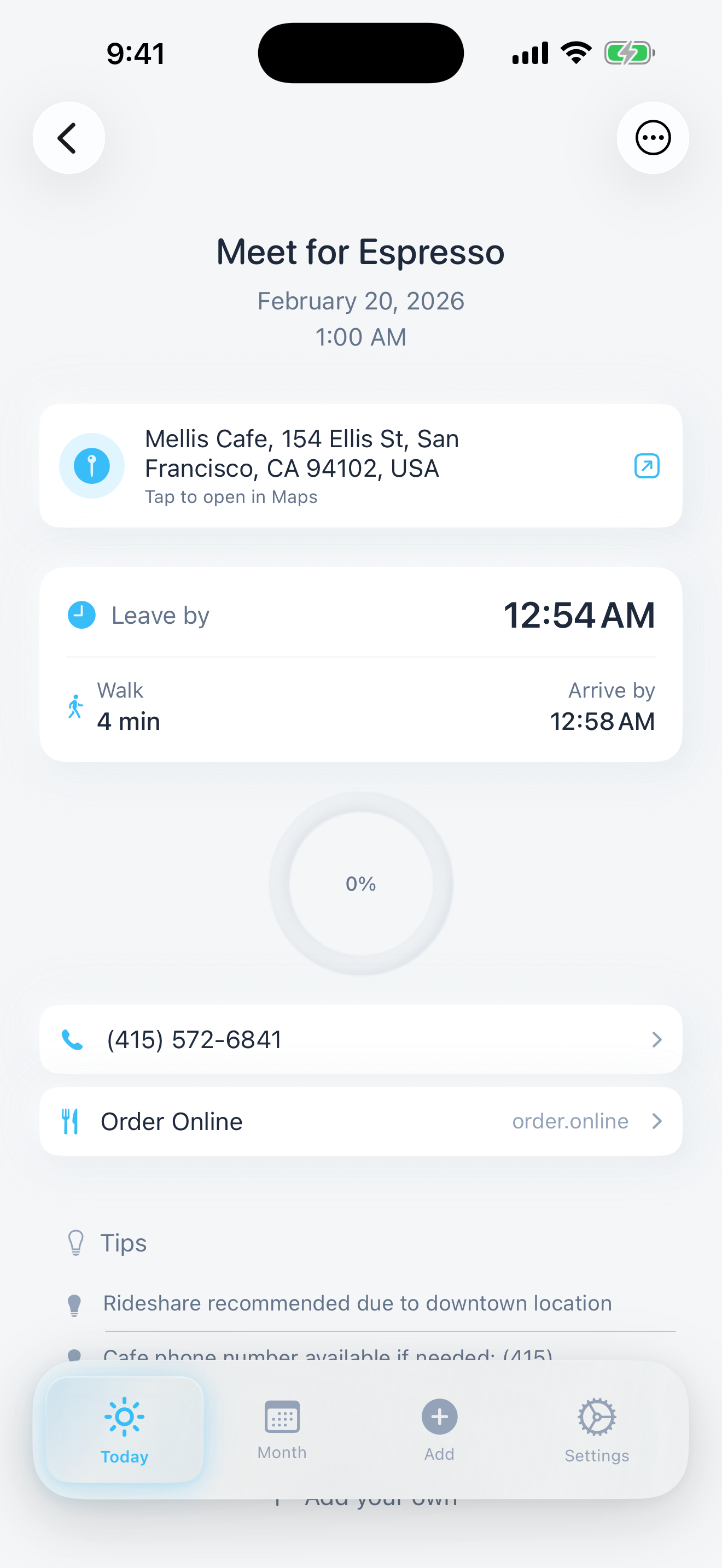
An event in the current iPhone app. Once an event has a place, Composed works out when to leave.
Where Composed is the wrong pick
- You think in projects. Composed has no projects, tags or priority levels. Todoist and Things 3 are built around them.
- You want to block out every hour. Composed shows your day in order, but it isn’t a drag-and-drop timeline. Structured is.
- You need it on a computer, or shared with a team. Composed is an iPhone app for one person’s plans. Todoist syncs to other devices and lets you assign tasks; Google Calendar has shared calendars.
- You keep more than five things of your own going at once and don’t want to pay. Apple’s apps and Microsoft To Do have no limit.
- You want habits or a focus timer. TickTick has both. Composed has neither.
Where it earns its place is the appointment, the trip, the birthday: plans with a time and a place, where the useful part is being told what to bring and when to leave.
What to check before you choose
What the free version leaves out. Read the listing for the word “Pro” or “Premium” and see which features follow it. A free planner that can’t see your calendar, or can’t repeat a task, may not be the planner you thought you were getting.
Whether it holds events, tasks, or both. A to-do app won’t tell you that two things overlap. A calendar won’t hold a loose list. Things 3 shows your calendar events beside your to-dos, Google Calendar shows tasks beside your events, and Composed keeps both in one daily view. Microsoft To Do is a list app.
Where else you need it. If you plan at a desk and check on the phone, look at the “Runs on” line. Things 3 charges per device family. Todoist and Google Calendar also work on a computer.
How you like to add things. Typing a sentence, dictating, forwarding an email and dragging on a timeline are different habits. The app you keep using is the one whose way of adding things suits you.
Planner apps for iPhone: common questions
What is the best free planner app for iPhone?
It depends on what you plan. Apple Calendar and Reminders are free, already installed, and can show your scheduled reminders inside Calendar. Microsoft To Do is free with no in-app purchases on its App Store listing. Structured, Todoist, TickTick, Google Calendar and Composed are free to download and each keeps different features for its paid version.
Is there a planner app for iPhone with no subscription?
Yes. Apple Calendar and Reminders and Microsoft To Do cost nothing. Things 3 is $9.99 once for iPhone and Apple Watch, with no in-app purchases. Structured sells a lifetime version of Pro for $99.99, and Composed sells one for $199.
Does iPhone have a built-in daily planner?
Not as one app, but Calendar and Reminders work together. Apple's iPhone User Guide says you can view, create, complete and edit reminders from the Reminders app right in Calendar. In Calendar, tap Calendars and select Scheduled Reminders to see them beside your events.
Is Composed really free?
Composed is free for up to 5 active items that you add yourself, with every feature included. Events imported from Apple Calendar or Google Calendar don't count, and neither do items that have passed or that you have marked done. Pro removes the limit for $5.99 a month, $39.99 a year with a 7-day free trial, or $199 once.
What is the difference between a planner app and a to-do app?
A to-do app holds a list of tasks. A planner puts what you have to do against time, so you can see what fits in a day. Several apps here do both: Things 3 shows calendar events beside your to-dos, Google Calendar shows tasks beside your events, Structured places the day on a timeline, and Composed keeps events and to-dos in one daily view.
Which planner app works on both iPhone and Mac?
Structured lists iPhone, iPad, Mac and Apple Watch on its App Store page. Todoist says it syncs across iPhone, iPad, Apple Watch and Mac. Things 3 has a Mac app that is sold separately from the iPhone app. Composed is built for iPhone.